This project demonstrates a self-healing infrastructure setup using Prometheus, Blackbox Exporter, Alertmanager, a custom monitoring service, and Ansible. It continuously monitors a service container, triggers alerts when the service goes down, and automatically restarts the service via Ansible playbooks.
⚙️ Architecture Blackbox Exporter → Prometheus → Alertmanager → Monitor (amtool + jq) → Ansible Runner → Restart Service
Blackbox Exporter → Probes endpoints (HTTP check for service availability).
Prometheus → Collects metrics & applies alert rules.
Alertmanager → Manages alerts and forwards them to monitoring.
Monitor container → Queries Alertmanager with amtool, parses alerts, and triggers recovery.
Ansible Runner → Executes a playbook to restart the failed service.
Service → A sample Nginx-based container being monitored.
📂 Project Structure
self-healing-infra/
│── alertmanager/
│ └── config.yml # Alertmanager config
│── ansible/
│ └── playbook.yml # Ansible playbook to restart service
│── monitor/
│ └── Dockerfile # Dockerfile for monitor container
│── scripts/
│ └── monitor_alerts.sh # Monitor script
│── prometheus/
│ └── prometheus.yml # Prometheus config & alert rules
│── docker-compose.yml # Multi-service orchestration
│── README.md # Project documentation
🖥️ Local Prerequisites
Before running this project, ensure you have the following installed on your local machine:
Docker Desktop (latest version, with WSL2 backend enabled if on Windows)
Git
(Optional) Visual Studio Code for editing configs
🚀 Getting Started 1️⃣ Clone Repository git clone https://github.com/your-username/self-healing-infra.git cd self-healing-infra
2️⃣ Build & Run docker compose up -d –build
3️⃣ Verify Setup
Blackbox Exporter → http://localhost:9115
Prometheus → http://localhost:9090
Alertmanager → http://localhost:9093
Service (Nginx) → http://localhost:8082
4️⃣ Test Self-Healing
Stop the service manually:
docker stop service
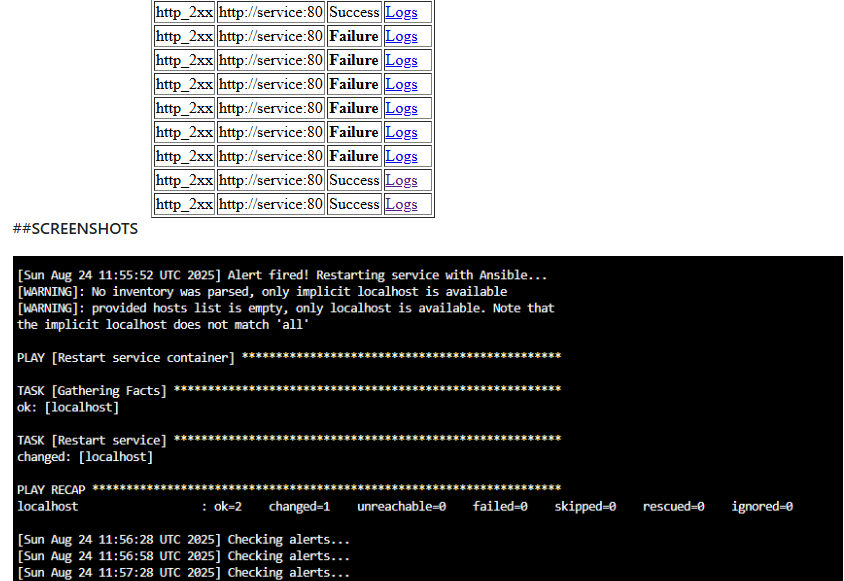
Within ~30 seconds, monitoring detects failure, Alertmanager fires an alert, and Ansible automatically restarts the service.
Check status:
docker ps
📊 Monitoring Flow
Blackbox Exporter fails probe → Prometheus rule triggers.
Prometheus sends alert to Alertmanager.
Alertmanager exposes active alerts.
Monitor script (inside container) checks alerts using amtool.
On ServiceDown alert, Ansible Runner executes playbook.
Service restarts automatically 🎉.
🛡️ Key Features
✅ Fully automated self-healing workflow. ✅ Works with Docker & Ansible inside containers. ✅ Uses Prometheus + Alertmanager for monitoring and alerting. ✅ Modular design – you can extend to restart any container or service. ✅ Cross-platform (tested on Windows + WSL2).
🔮 Future Enhancements
Integrate with Grafana for dashboards.
Support multi-service healing.
Use Kubernetes + Operators for scaling.
Extend Ansible playbooks for VM/Cloud service recovery.