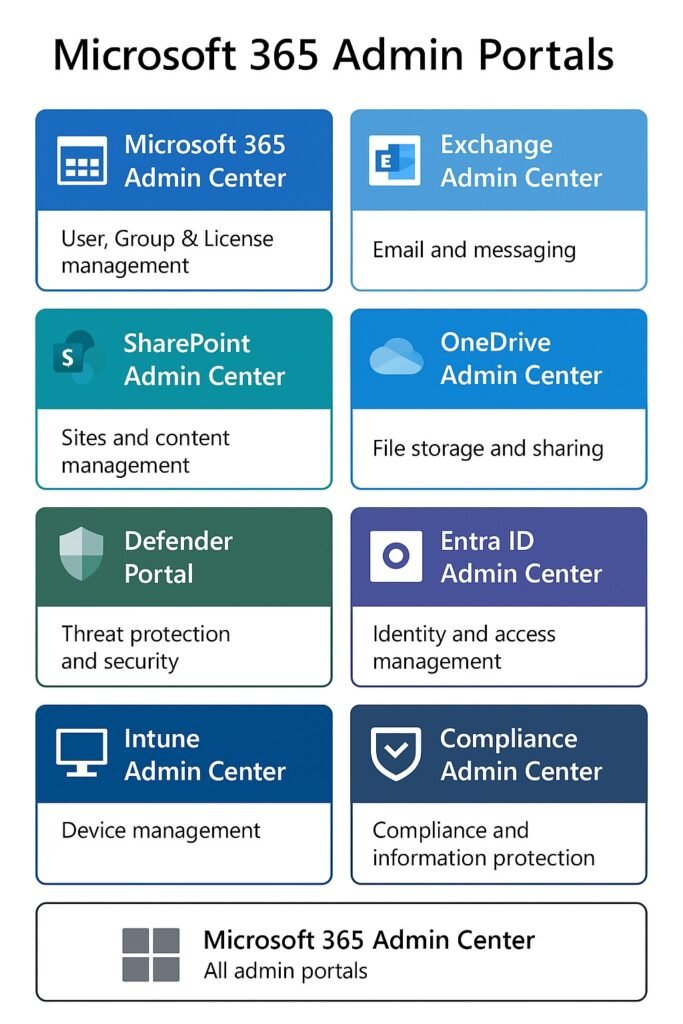
🌐 1. Microsoft 365 Admin Center (M365 Admin Portal)
Purpose:
This is the main management portal for Microsoft 365 services.
What you manage here:
- Users (create / delete / licenses)
- Groups (DLs, Microsoft 365 groups)
- Billing, subscriptions, licenses
- Devices (basic)
- Apps & services
- MFA (basic legacy MFA settings)
- OneDrive admin access
- SharePoint admin shortcut
- Security/Compliance shortcuts
Best for:
IT admins managing general day-to-day tasks.
🟦 2. Microsoft Entra Admin Center (Formerly Azure AD Admin Center)
Purpose:
Used to manage identity, security, authentication, and access control.
What you manage here:
- Users & Groups (advanced)
- Conditional Access Policies (MFA rules)
- Authentication methods (FIDO, Authenticator, SMS)
- Privileged Identity Management (PIM)
- Enterprise applications (SSO/SAML apps)
- Device identities (Azure AD joined)
- Roles & permissions
- Security logs & audit logs
This controls the user login + identity part of Microsoft 365.
Best for:
Identity Admins / Security Admins / Access Control.
🟧 3. Exchange Admin Center (EAC)
🔗 https://admin.exchange.microsoft.com
Purpose:
Used for managing email, mail flow, and Exchange Online settings.
What you manage here:
- Mailboxes (user, shared, resource)
- Mail flow rules (Transport Rules)
- Email tracing (Message Trace)
- Distribution lists
- Connectors (SMTP, Hybrid)
- Accepted domains
- Retention policies (basic)
- Anti-spam settings (Defender redirect)
Best for:
Messaging / Email administrators.
🟩 4. SharePoint Admin Center
🔗 https://admin.microsoft.com/sharepoint
OR
🔗 https://tenant-admin.sharepoint.com
What you manage:
- SharePoint sites
- OneDrive settings
- Sharing policies
- Storage usage
- Content services
🟨 5. Teams Admin Center
🔗 https://admin.teams.microsoft.com
Purpose:
Manage Microsoft Teams settings.
What you manage:
- Teams, channels, policies
- Voice/Calling (Phone System)
- App permissions
- Meeting policies
- Device management (Teams Rooms)
🟥 6. Security & Compliance Portals
These are used for advanced security, threat protection, and compliance.
6.1 Microsoft 365 Defender Portal
🔗 https://security.microsoft.com
Controls:
- Anti-malware
- Safe Links, Safe Attachments
- Threat hunting
- Attack simulation training
- Email security policies (advanced)
6.2 Compliance Portal
🔗 https://compliance.microsoft.com
Controls:
- Data Loss Prevention (DLP)
- Information Protection (labels)
- Retention policies
- eDiscovery
- Audit logs
- Content search
🟫 7. Azure Portal (Full Cloud Management)
Controls:
- Virtual Machines
- Storage accounts
- Networking (VNETs, VPNs)
- Azure AD logs (also visible here)
- Key Vaults
- App Services
Used when your organization also uses Azure cloud beyond Microsoft 365.
🟪 8. Intune (Endpoint Manager)
🔗 https://intune.microsoft.com
OR
🔗 https://endpoint.microsoft.com
Controls:
- Device management
- App deployment (EXE/MSI)
- Device configuration policies
- Compliance policies
- Windows Update for Business
📌 Summary (Simple Table)
| Portal | Purpose | Main Responsibility |
|---|---|---|
| M365 Admin Center | Core Microsoft 365 admin | Users, licenses, basic settings |
| Entra Admin Center | Identity & Access | MFA, SSO, roles, authentication |
| Exchange Admin Center | Email & Mail Flow | Mailboxes, message trace, DLs |
| Teams Admin Center | Teams management | Teams, policies, calling |
| SharePoint Admin Center | SharePoint/OneDrive | Sites, sharing, OneDrive |
| Security.microsoft.com | Protection & Threats | ATP, email security, alerts |
| Compliance.microsoft.com | Data governance | Retention/DLP/audit |
| Intune / Endpoint Manager | Device & App Mgmt | Windows/Devices, security |
| Azure Portal | Cloud Infrastructure | VMs, networks, services |